
Why the tab is not really lost
The page is usually still open; its identity has collapsed. Twenty tabs can become twenty favicons, and repeated Docs, Figma, email, or dashboard tabs no longer carry enough context in the strip.
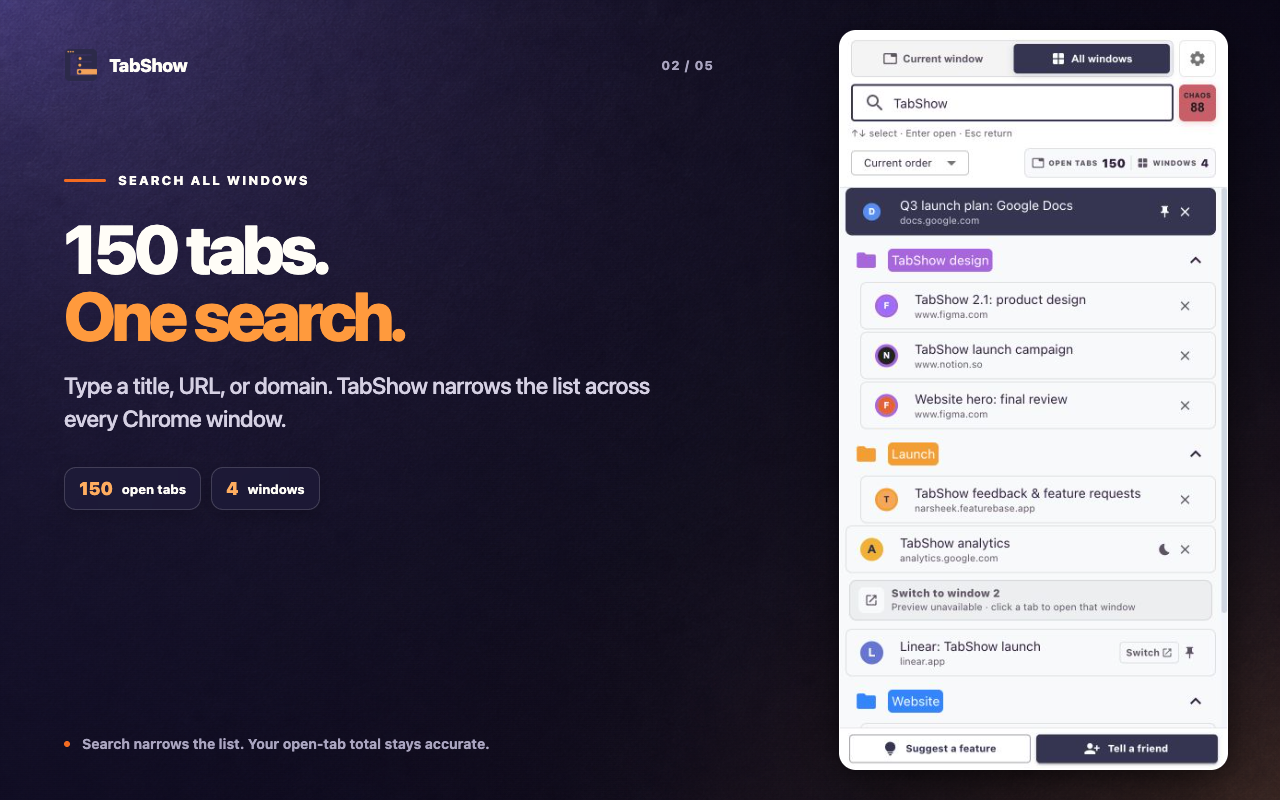
TabShow expands that context vertically. Search checks page titles, URLs, and domains. A query such as a project name, site, or path reduces the list before visual preview confirms the exact page.
- Start with a word from the page title.
- Try the domain or a recognizable part of the URL.
- Use All windows if the result may be in another window of this Chrome profile.
- Use Arrow keys to select results, or hover a current-window result to preview it.
A repeatable recovery workflow
Open TabShow from the toolbar or your Chrome extension shortcut. Type the strongest clue you remember. Move through the filtered results with the Arrow keys, then press Enter to open the selected tab. Hover a current-window result when you want the live page to confirm it first.
The important part is reversibility. A wrong hover candidate does not become another costly detour because TabShow restores the original tab.
- Arrow Down or Arrow Up selects another result.
- Enter opens the selected tab.
- Escape returns to the original tab.
- Current window and All windows keep scope explicit.
Prevent the next hunt without reorganizing everything
You do not need a perfect tab system to benefit. Existing Chrome groups remain visible, and sort modes let you use browser order, recent use, recent addition, domain, or group when one view becomes more useful than another.
TabShow is not a promise to eliminate tab overload. It makes the overload more searchable and makes recognition less disruptive.